DSAR Guide for Employers
DSAR guide for employers: respond to employee data subject access requests. GDPR compliance, timelines, data collection, and response best practices 2026.
By Alex Boyd
DSAR guide for employers: respond to employee data subject access requests. GDPR compliance, timelines, data collection, and response best practices 2026.
Sometimes, employees, and sometimes customers/consumers whose personal data appears in your systems, will request records from you that hold their personal information. These queries, called data subject access requests (or DSARs), have become a normal, recurring part of running a business.
This complete DSAR guide covers everything you need to know to compliantly and easily fulfill these requests, and guides you through dealing with the mountain of data involved.
Please note: This DSAR guide is for informational purposes only and does not constitute legal advice.
A DSAR (data subject access request) is a formal request from an individual asking for access to the personal data your organization holds about them, valid in places like the EU, UK, and California.
DSARs are not completely preventable. They often happen during performance disputes, internal investigations, and routine requests. They also tend to be high-stakes: one survey found that DSARs are often high risk to a business, and linked to employment litigation, because they sit at the center of core employee privacy rights.
While normal, DSARs can still be a heavy lift. They require employers to quickly provide personal data which is often scattered across email, HR systems, and collaboration tools like Slack.
DSARs are growing more and more common, with research showing that 36% of internet users exercised their rights to DSAR in 2024, up from 28% in 2023. Employees make up 66% of DSAR requests, but they can also be made by customers/consumers, including where a customer was discussed in internal tools like Slack (e.g. customer support ticketing or similar).
Who can submit a DSAR?
Not just current employees. Former employees, job applicants, interns, contractors, and anyone whose personal data you've processed in an employment-related context can make DSARs. DSARs can also be submitted by customers/consumers if you process or store their personal data, including situations where a customer is referenced or discussed in Slack (for example in customer support ticketing, account escalations, or incident response).
What counts as personal data?
Anything that can be linked – directly or indirectly – to the person involved. Think: HR records, comms like Slack/email, logs, and performance data.
What are typical DSAR outputs?
Employers must provide copies of the requester's personal data along with clear explanations of how the data was processed.
Critical to this DSAR guide: which legal frameworks actually govern these principles.
The EU GDPR applies to employers established in the EU, and to non-EU organizations that target EU data subjects. Core rights for employees requesting data include accessing their personal data, receiving a copy of it, and information on its purpose/recipients/retention. GDPR compliance is critical and fines for violations total billions of dollars annually.
Employers typically must respond within one month, but have the option to extend for complex or high-volume requests
After Brexit, UK GDPR principles remained intact. For DSARs, the rights and expectations are nearly identical to the EU framework: employees can request access to their data, and organizations must provide both the data and an explanation of the processing behind it.
The Information Commissioner's Office (ICO) provides detailed guidance tailored to workplace scenarios.
California privacy law (CCPA/CPRA) grants California employees, applicants, contractors, and other workers the right to know and access their personal information. However, employers have to meet certain thresholds (such as revenue earned or volume of data processed).
Employees can request the "right to know/access" the categories of information you have, such as identifiers, customer records information, biometric information, and commercial information. They can also request specific pieces of personal data.
Employers must typically respond within 45 days, but can seek a possible 45-day extension when reasonably necessary.
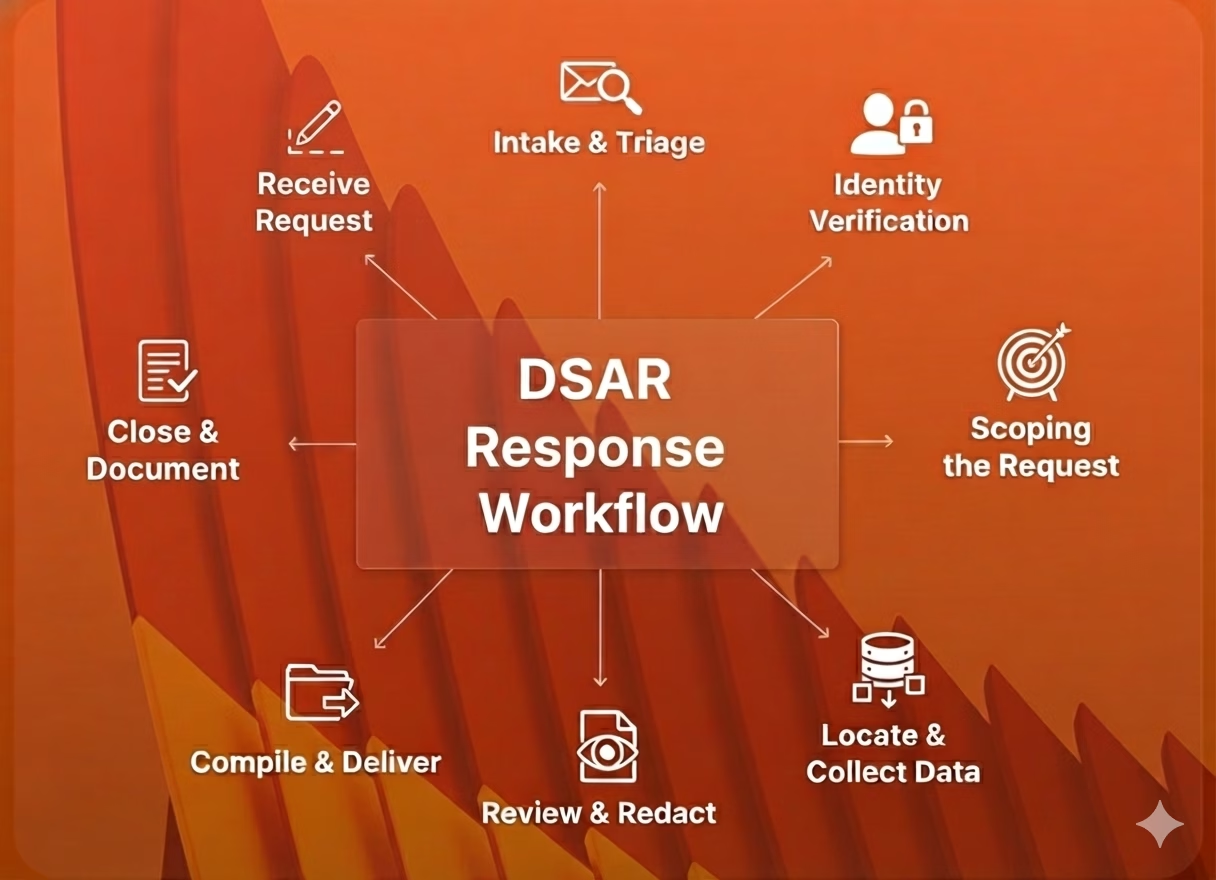
A compliant, streamlined request response relies on a clean, repeatable DSAR workflow.
DSARs don't follow a specific script. They can arrive through HR, email, a web form, or even a HelpDesk ticket. That's why it's important to first determine how DSAR requests can be received – and even recognized in the first place.
Process: once you receive a request, quickly intake it, log it, and start the response deadline clock.
Before releasing any personal data, verify that the requester is who they claim to be, using reasonable steps. For employees, your existing authentication methods might be enough. Ensure your processes are aligned with any local rules or laws.
Before completing the request, understand what it entails. What systems, timeframes, and data categories should be included in the query?
Identify all systems that may contain the requester's personal data. This often includes HRIS, ATS, payroll, email, file storage, Slack, and security systems.
Before releasing the data, remove or mask third-party information, and legally privileged/confidential data.
Package the personal data in a format that's secure, organized, and readable. Include the required explanations: why the data was processed, the categories of data involved, data governance retention policies, and your employee's rights.
Maintain a record of what you searched, what steps you took, what decisions were made, timelines, and any extensions or refusals. This record will be essential if the request is later challenged or is part of a dispute.
In many cases, DSARs must be fulfilled, but there are circumstances where an employer can lawfully narrow the response or decline parts of it.
Scenarios where you might be able to limit or refuse a DSAR include if a request is:
If you limit or refuse a request, you need to give a clear and concise explanation why, within the original response deadline. State which parts of the request you are refusing or withholding, and your basis for doing so. A record of your analysis and decision-making should be maintained in case of regulatory review or future disputes.
Next up in our DSAR guide: the dance involved in handling Slack data. Slack communications often get swept up in DSARs. But unlike HR systems or email chains, Slack exports arrive as a huge collection of JSON files, which are essentially unreliable without proper handling practices.
Slack data is often involved in DSARs because it holds personal data in messages, user profiles, reactions, files, and logs. This makes Slack a core system of record. Importantly, Slack DSAR scope is not limited to employees: Customers/consumers may also have DSAR rights where their personal data appears in Slack (for example, if a customer was discussed in customer support ticketing or similar workflows).
Both public and private channels are in scope, and direct messages are no different. If the requester participated in the conversation, or if Slack contains personal data about them, it could be in scope.
When reviewing Slack for a DSAR, consider the full range of data types Slack produces:
Your Slack export options depend on which plan you use, and can typically only be executed by workspace/org owners and admins.
All of the plans (including Free and Pro) allow for exports of messages and file links from public channels. Business+ and Enterprise plans have more advanced options, such as robust exports from private channels and DMs.
To easily filter and review Slack exports, many teams choose to use eDiscovery/DSAR software. These systems clearly organize sprawling JSONs, allowing you to run fast, targeted Slack export searches and reduce hours of manual effort. The same approach works for the email side of a DSAR: ViewExport also opens Outlook and Microsoft 365 PST archives, so one tool can cover both the Slack and email searches a request requires.
Don't let Slack data trip up your DSAR. Follow this defensible step-by-step guide to compliantly respond to requests:
Slack DSARs sound like they should be straightforward – "just export and go." In reality, they often get off-track. This can happen when teams:
Lastly, in our DSAR guide, the fine print: a strong DSAR process relies on clear governance, policies, and training.
First, maintain a written DSAR policy. It should cover system-by-system procedures, including Slack – how exports are requested, who is authorized to access them, and which tools are used for review.
Also, use data mapping for DSAR to list key systems (HR, ATS, Slack, etc.) and owners. This can shorten response times, drive accountability, and reduce the risk of overlooking a key source.
Next, equip your team with the skills they need to execute DSARs. Train HR, IT, legal, and managers on spotting DSARs, their role in the workflow when one arrives, and the basics of HR data privacy.
Lastly, use basic tooling (like ticketing, dashboards, and templates) to track deadlines and status. DSARs are time-bound, and simple workflow tools can do a lot to prevent missed obligations.
DSARs are a normal part of HR and legal operations in the EU, UK, and California. At the same time, common tools like Slack greatly expand the volume and complexity of employee data.
DSARs might seem overwhelming, but they don't have to be. A repeatable workflow, well-defined Slack procedures, and cross-functional training significantly reduce DSAR risk, cost, and stress.
If your DSAR response still starts from scratch every time, now's the moment to formalize it. Map your systems, write a playbook that covers Slack and email, and run a tabletop exercise with HR, legal, and IT so your team can respond quickly and confidently to the next request. Still have questions? Reach out to our team today!

PST, EML, MSG, and MBOX are four different ways to package email data, and they don't work interchangeably. Here's what each one stores, where it comes from, and which tools open or convert it.
 Alex Boyd
PST files are Outlook's local email archive format. They show up in migrations, eDiscovery exports, and investigations. Here's what they contain, how to open one with or without Outlook, and why PST makes a poor long-term archive.
Alex Boyd
What EML files are, where they come from, how to open them on Windows and Mac, and how to convert EML to PDF for review or production in a legal or compliance context.
Alex Boyd