Export Slack messages, channels & DMs (all plans). Includes JSON viewer solution, admin & non-admin methods, and how to read exported files. Updated 2026.
By Alex Boyd
Quick Answer: How to Export Slack Messages
Non-admins: See alternative methods below.
Whether you need to export Slack conversations for compliance, legal holds, moving to another platform, or just want a permanent record, this guide explains how to export Slack data across all plans—Free, Pro, Business+, and Enterprise Grid.
We'll also cover the limitations of each Slack plan, non-admin workarounds, and how to actually read the exported data (spoiler: Slack exports in JSON, which isn't human-readable without tools).
Note: Discovery API access is not automatic. Slack reviews requests and may deny access without proper justification.
Exporting for Subpoenas & Legal Requests
If you receive a subpoena or court order demanding Slack data, proper export and preservation is critical. You'll need to export private channels, DMs, and metadata that may not be included in standard exports - and you must do it immediately to avoid spoliation sanctions. Our Slack subpoena response guide covers the complete legal process, including objections, review workflows, and production formats that courts will accept.
Non-Admin Export Methods
If you're not an admin, your options are limited but not zero:
1. Copy-Paste (Manual)
Best for: Small amounts of data
How: Scroll through the channel, select messages, copy, paste into a document
Limitations: Time-consuming, no metadata, no file attachments
2. Browser Extensions
Best for: Quick exports of visible messages
How: Install a browser extension, open Slack in browser, export visible content
Limitations: Inconsistent quality; may break with Slack updates; security concerns
Export Formats: JSON vs TXT
JSON Format (Default)
Slack exports in JSON (JavaScript Object Notation):
Structure: Organized by channel → date → messages
Includes: Full metadata (timestamps, user IDs, reactions, edits, thread IDs)
Readable: ❌ Not human-readable without tools
Example JSON snippet:
{
  "type": "message",
  "user": "U1234ABCD",
  "text": "Hey team, the Q4 report is ready.",
  "ts": "1672531200.000000"
}
When to use JSON:
You need full metadata (legal/compliance use cases)
You're importing into an eDiscovery or analytics tool
You want to preserve message structure (threads, reactions)
TXT Format (Alternative)
Some third-party tools (like ViewExport) convert JSON to plain text or HTML:
Structure: Formatted as readable conversations
Includes: Timestamps, usernames, message content
Readable: ✅ Yes
When to use TXT/HTML:
You just want to read the messages
You're sharing with non-technical stakeholders
You don't need advanced metadata
How to Read Slack Export Files
Raw Slack exports are not human-readable. Here's how to view them:
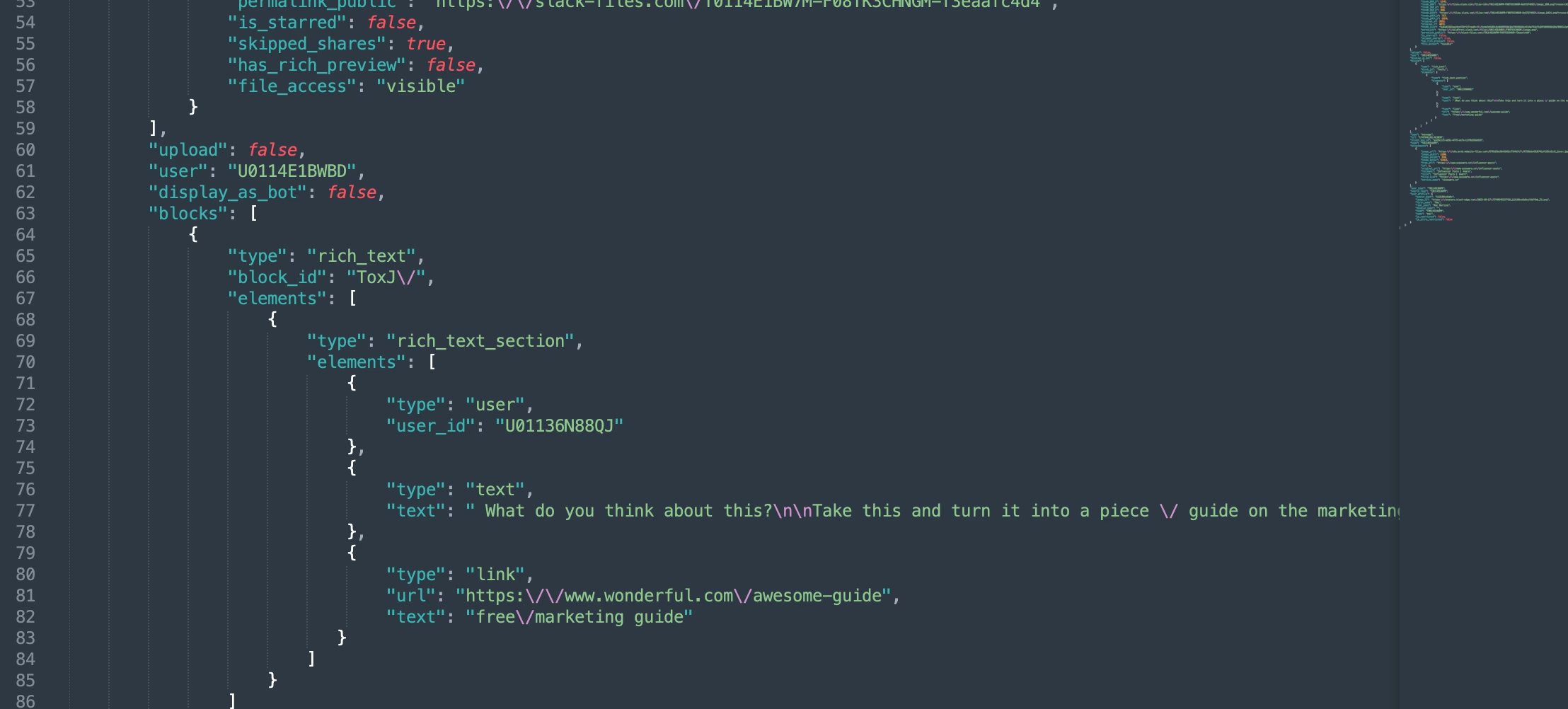
Open JSON files in a text editor (VS Code, Sublime, Notepad++)
Search for keywords using Ctrl+F
Example JSON code from a Slack export file
Limitations:
Tedious for large exports
Requires understanding of JSON syntax
No visual threading or formatting
Troubleshooting Common Export Issues
1. "Export denied" (Not an admin)
Solution: Ask your Workspace Owner/Admin to grant you export permissions or request the export on your behalf.
2. JSON files won't open
Solution: JSON files aren't meant to be "opened" like documents. Use ViewExport or a JSON viewer.
3. Missing messages in export
Possible causes:
Messages were deleted before export
Retention policy auto-deleted old messages
Private channels require Discovery API (Enterprise Grid)
4. Files not included in export
Solution: Slack exports contain links to files, not the files themselves. Download files separately before they're deleted.
5. Export taking too long
Why: Large workspaces with years of data can take hours.
Solution: Break exports into smaller date ranges.
6. Can't find the download link
Solution: Check your email spam folder. The link expires after 7 days, so download promptly.
Export Methods Comparison
Method
Who Can Use
What's Exported
Format
Best For
Slack Standard Export
Workspace Admin
Public channels only
JSON
Compliance, audits, backups
ViewExport
Anyone with export file
Whatever's in the export
JSON → PDF/HTML/CSV
Reading, searching, eDiscovery
Discovery API
Enterprise Grid Org Owner
Public, private, DMs
JSON
Legal holds, investigations
Slackdump
Any user (tech-savvy)
Channels you're in
JSON
Personal backups
Backupery
Any user (paid)
Channels you're in
Multiple formats
Automated backups
Copy-Paste
Anyone
Visible messages only
Text
Small, one-off exports
Frequently Asked Questions
Do I need admin access to export Slack?
Yes, you need to be a Workspace Owner or Admin.
Can I export private channels on the Free plan?
No. Only Business+ and Enterprise Grid support private channel exports (with restrictions). If you don't have Business or Enterprise, you have to apply to Slack with a valid legal reason, to get private channel and DM data.
Are deleted messages included in exports?
Usually yes, if the export was created after the message was posted. But if a message was deleted before the export, it won't be included. If you need to track changes or deletions, export often and use the enterprise version of ViewExport to see edits/deletions easily.
How do I read JSON exports?
Use ViewExport, a free JSON viewer, or a text editor. JSON is practically not human-readable on its own since it's 'pseudo-code'.
Can I export just one channel?
No (not via Standard Export). Slack exports the entire workspace. Use the Discovery API (Enterprise Grid) for granular control.
How long does a Slack export take?
Small workspace (< 10k messages): Minutes
Medium workspace (10k–100k messages): 15–60 minutes
Large workspace (>100k messages): Hours
Can I schedule automatic exports?
Not natively. Use third-party tools like ViewExport to back up your exports over time.
Do exports include edit history?
Yes, if you have Enterprise Grid. Standard exports show only the latest version of edited messages.
Are exports free?
Yes, Slack's native export is free. Third-party tools may charge.
Are Slack Connect channels included in data exports?
Yes, but only the messages and data originating from your own organization. You don't have "legal custody" of the other organization's messages, so your exports will not include this information. And if you scrape the data manually, you can run into legal issues if that scraped data ends up getting turned in as legal evidence, so be careful here. Let us know if you need to talk to a legal eDiscovery expert, and we can put you in touch.
What's the difference between Corporate and Compliance Export?
None (functionally). The names differ by region for regulatory reasons.
{ "@context": "https://schema.org", "@type": "FAQPage", "mainEntity": [ { "@type": "Question", "name": "Do I need admin access to export Slack?", "acceptedAnswer": { "@type": "Answer", "text": "For official exports: Yes, you need to be a Workspace Owner or Admin." } }, { "@type": "Question", "name": "Can I export private channels on the Free plan?", "acceptedAnswer": { "@type": "Answer", "text": "No. Only Business+ and Enterprise Grid support private channel exports (with restrictions)." } }, { "@type": "Question", "name": "Are deleted messages included in exports?", "acceptedAnswer": { "@type": "Answer", "text": "Usually yes, if the export was created after the message was posted. But if a message was deleted before the export, it won't be included." } }, { "@type": "Question", "name": "How do I read JSON exports from Slack?", "acceptedAnswer": { "@type": "Answer", "text": "Use ViewExport, a free JSON viewer, or a text editor. JSON isn't human-readable on its own." } }, { "@type": "Question", "name": "Can I export just one channel from Slack?", "acceptedAnswer": { "@type": "Answer", "text": "No (not via Standard Export). Slack exports the entire workspace. Use the Discovery API (Enterprise Grid) for granular control." } }, { "@type": "Question", "name": "How long does a Slack export take?", "acceptedAnswer": { "@type": "Answer", "text": "Small workspace (< 10k messages): Minutes. Medium workspace (10k–100k messages): 15–60 minutes. Large workspace (>100k messages): Hours." } }, { "@type": "Question", "name": "Can I schedule automatic Slack exports?", "acceptedAnswer": { "@type": "Answer", "text": "Not natively. Use third-party tools like ViewExport or build a custom solution with the Slack API." } }, { "@type": "Question", "name": "Do Slack exports include edit history?", "acceptedAnswer": { "@type": "Answer", "text": "Yes, if you use the Discovery API (Enterprise Grid). Standard exports show only the latest version of edited messages." } }, { "@type": "Question", "name": "Are Slack exports free?", "acceptedAnswer": { "@type": "Answer", "text": "Yes, Slack's native export is free. Third-party tools may charge." } }, { "@type": "Question", "name": "What's the difference between Corporate and Compliance Export?", "acceptedAnswer": { "@type": "Answer", "text": "None (functionally). The names differ by region for regulatory reasons." } } ]}
Best Practices for Exporting Slack Data
1. Export Regularly
Don't wait until you need the data. Export quarterly or before major events (layoffs, audits, litigation).
2. Store Exports Securely
Slack exports contain sensitive data. Encrypt and store them in secure locations (encrypted drives, secure cloud storage).
3. Document Your Export Process
If exporting for legal reasons, document:
Who requested the export
Date range exported
Channels included
Custodian of the data
4. Test Exports Before You Need Them
Run a test export to ensure you understand the process and can access the data when needed.
5. Know Your Legal Obligations
If subject to regulations (GDPR, HIPAA, etc.), understand your data retention and export requirements. Work with legal counsel.
Exporting Slack conversations is straightforward if you're an admin on Free/Pro/Business+ (public channels only) or Enterprise Grid (full access with Discovery API).
Key takeaways:
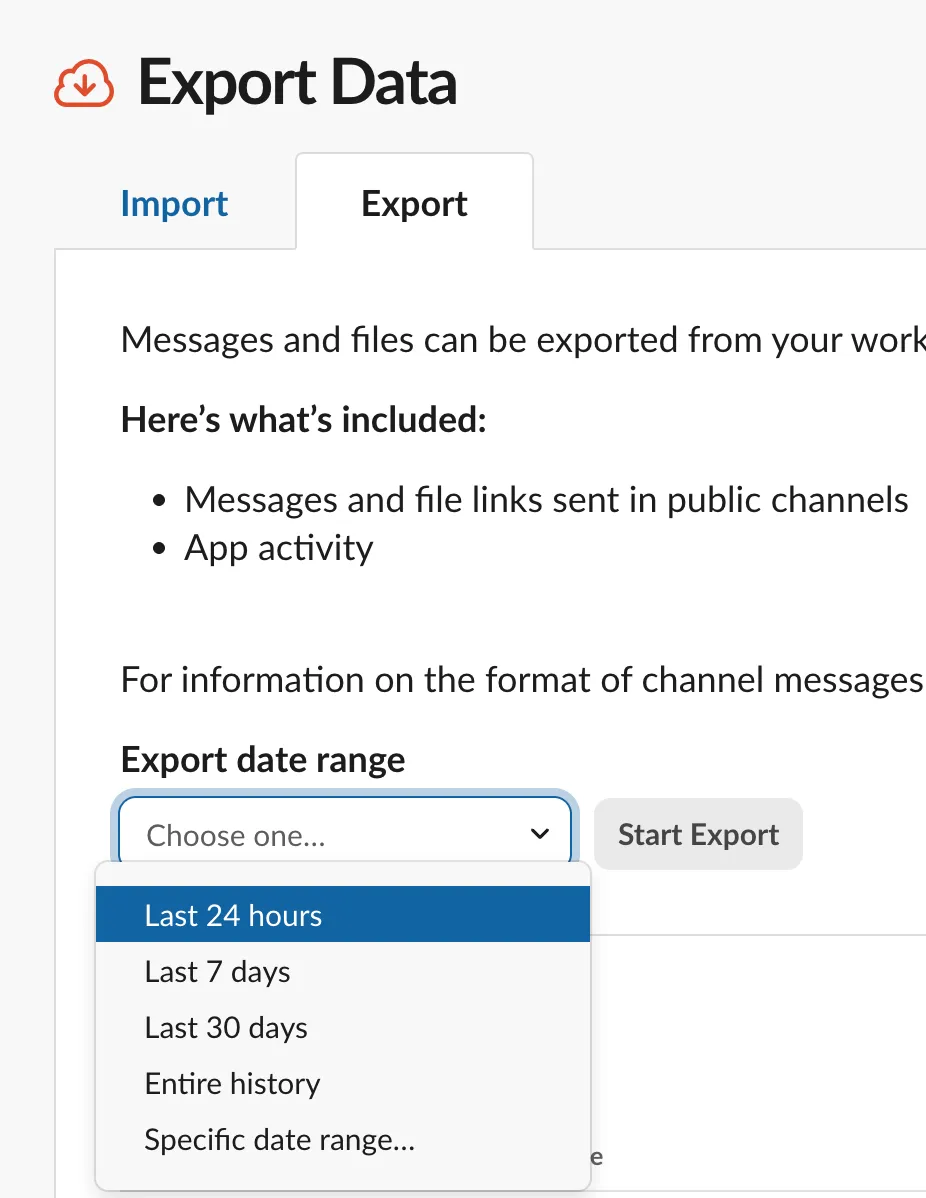
Admins can export via slack.com/services/export
Slack exports in JSON (not human-readable without tools)

 Alex Boyd