How to Place a Legal Hold on Slack: Step-by-Step Guide for 2026
Step-by-step guide to placing legal holds on Slack. Learn retention requirements, Enterprise Grid features, and preservation best practices for litigation.
By Alex Boyd
Step-by-step guide to placing legal holds on Slack. Learn retention requirements, Enterprise Grid features, and preservation best practices for litigation.
When litigation or investigations loom, every organization has the same responsibility: preserve the relevant evidence. That's what legal holds are for. But these days, the evidence you need isn't just sitting in email archives anymore. It's often in Slack threads, DMs, emojis, and GIFs. And when Legal needs that data, it's usually IT who gets the request to retain and preserve it.
Slack doesn't give you tools to manage this out of the box however, making it tricky to pull defensible evidence out of it. This guide explains how legal holds work in Slack, why they matter, and how to manage them without endless headaches.
"Since launching to the public in 2013, Slack has made everyone's work life easier and more productive. Except for legal professionals handling ediscovery."
-Everlaw
A legal hold (sometimes called a litigation hold or preservation order) is a formal instruction to preserve data that may be relevant to a pending or anticipated legal matter.
That data can include both paper records and electronically stored information (ESI): emails, chat logs, attachments, databases, and yes — Slack conversations.
Legal holds are issued when litigation or an investigation is reasonably anticipated. Common Slack-related scenarios include:
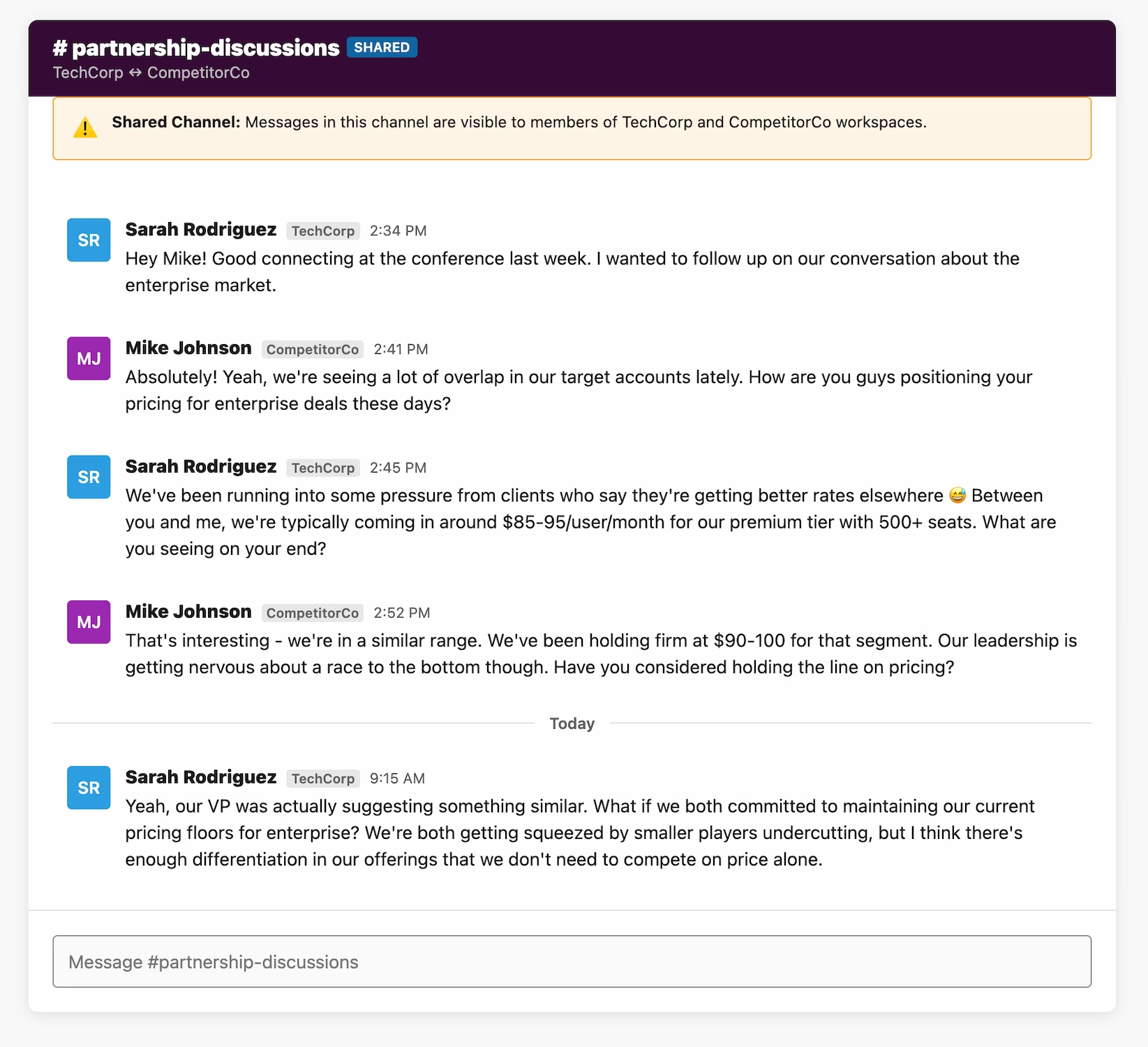
Sometimes Legal drives the hold (responding to outside counsel or a regulator). Other times HR triggers it internally. In both cases, IT gets the call to preserve Slack data before anything is lost.
When You Receive a Subpoena
If your organization receives a subpoena, litigation hold notice, or court order demanding Slack data, you must immediately place a legal hold to preserve all potentially responsive data. Failure to preserve data after receiving a subpoena can result in spoliation sanctions, even if you plan to object to the request. The typical response timeline is 30-40 days from receipt to production, and preservation must happen on Day 1. For the complete process including objections, collection methods, review workflows, and costs ($15K-$100K+), see our Slack subpoena response guide.
Slack adds a layer of complexity that email and file servers never had:
These challenges explain why many IT teams dread the phrase: "Can you pull this Slack data for Legal?"
Here's how Slack is different from traditional formats:
| Legal Hold Factor | Email (Traditional) | Slack (Modern) |
|---|---|---|
| Message structure | Linear threads (reply-all chains) | Nested threads + emoji reactions + edits |
| Preservation tools | Mature litigation hold features (Exchange, Gmail) | Native legal hold on Enterprise Grid; requires third-party tools on other plans |
| Data format | Standardized (.PST, .MBOX, .EML) | JSON (not human-readable without conversion) |
| Retention defaults | Often indefinite (or 90+ days) | 90 days (Free/Pro), custom for paid plans |
| Edit/delete capabilities | Sent emails are immutable (generally) | Users can edit/delete messages; legal hold prevents deletion on Enterprise Grid |
| Searchability | Built into email clients (Outlook, Gmail) | Slack search limited by plan tier and retention |
| Legal hold enforcement | IT can freeze mailboxes server-side | Enterprise Grid: native preservation; Other plans: requires export + monitoring |
| Metadata preservation | Headers, timestamps, BCC fields standard | Reactions, thread context often lost in basic exports |
| Cross-platform issues | Rare (email is standardized) | Integrations spread data across tools (Salesforce, Jira, etc.) |
| Attorney familiarity | High (decades of eDiscovery precedent) | Low (many attorneys unfamiliar with Slack structure) |
One note on that table: the standardized email formats in the left column are no longer a separate problem to solve. ViewExport opens both sides, Slack JSON exports and .PST email archives, in the same searchable workspace, so a hold that spans email and Slack doesn't require two review tools.
Failing to preserve Slack data can lead to spoliation — loss or alteration of evidence. Courts take this seriously.
The bottom line: treating Slack as an informal channel won't cut it in court.
Short answer: Yes, but only on Enterprise Grid.
Slack introduced a native legal hold feature for Enterprise Grid organizations that allows admins with the "Legal Holds Admin" role to preserve messages and files from specific custodians.
What Slack's legal hold feature does:
✅ Preserves messages and files from designated members
✅ Overrides workspace retention settings (data won't be deleted)
✅ Protects content even if users edit or delete messages
✅ Supports up to 1,000 custodians per hold
✅ Allows scoping by conversation type (all conversations vs. DMs only)
✅ Accessible via JSON export or Discovery API
Critical limitations:
❌ Slack Connect conversations are NOT preserved (huge gap for external communications)
❌ Emoji reactions are NOT included (problematic for regulated industries)
❌ Messages in deleted channels are NOT saved (must preserve channels separately)
❌ Only available on Enterprise Grid (Free, Pro, Business+ plans have no legal hold capability)
If you're on Enterprise Grid, Slack's legal hold feature is a good foundation, but you still need to manually track and document holds (Slack doesn't provide custodian notification workflows). And preserve Slack Connect channels and emoji reactions separately (major oversight in Slack's feature). You also have to prevent channel deletion during the hold period.
If you're on Free, Pro, or Business+ then you have no native legal hold option. You'll need to rely entirely on manual exports and third-party preservation tools.
Many organizations still track legal holds with spreadsheets and email reminders. That's a recipe for missed custodians and inconsistent documentation.
Modern tools made for legal teams make the process smooth:
ViewExport on the other hand is a Slack eDiscovery tool designed for parsing and searching Slack exports, and it opens Microsoft 365 PST email archives too. Instead of IT spending weeks searching, marking, and editing JSON files, you get a searchable, export-ready workspace for compliance.
Enterprise Grid? → Use native legal hold feature
Other plans? → Continue to Step 2
Free plan (90-day limit)? → Export immediately
Pro/Business+? → Continue to Step 3
Public channels only? → Manual export
Private channels/DMs needed? → Continue to Step 4
• One-time need → Third-party export tool
• Ongoing litigation → Consider upgrading to Enterprise Grid
• Limited budget → Manual export + conversion tools
Okay, now let's go through that in detail...
Here's a step-by-step guide to manually exporting Slack data for legal holds, summarizing this fuller article here.
1. Log in to your Slack workspace as an Owner or Admin
2. Click your workspace name (top-left) → Settings & administration → Workspace settings
3. In your browser, navigate to https://[your-workspace].slack.com/admin
4. In the admin panel, go to Settings → Import/Export Data
5. Click Export tab
Slack offers different export options depending on your plan:
| Plan Tier | What You Can Export |
|---|---|
| Free | Public channels only (no DMs, no private channels, no files) |
| Pro | Public channels only |
| Business+ | Public channels + private channels (with user consent) |
| Enterprise Grid | Full workspace exports via API (including DMs, with approvals) |
If you're on Free/Pro: You'll only get public channel messages. This is insufficient for most legal holds.
If you're on Business+/Enterprise Grid: You can request broader exports, but may need to notify users or get consent for private channel access (check your jurisdiction's privacy laws).
Specify the date range matching your legal hold preservation period. If the case is ongoing, you'll need to re-export periodically to capture new messages in scope. Next, click "Start Export" and Slack will process the request (timeframe varies based on data volume). Then they email you with a download link when ready.
Timeline expectations:
- Small workspaces (<1,000 messages): 5-10 minutes
- Medium workspaces (10,000-100,000 messages): 30-60 minutes
- Large Enterprise Grid workspaces: Several hours to days
1. Click the download link (expires after 7 days)
2. Extract the .zip file
3. Inside, you'll find:
- JSON files for each channel (one file per channel, per day)
- users.json — list of workspace members
- channels.json — metadata about channels
- (Usually) a files folder with attachments
Here's a preview of the JSON structure you'll encounter:
  [
    {
      "type": "message",
      "user": "U123ABC",
      "text": "Can we approve the Q4 budget today?",
      "ts": "1609459200.000500",
      "thread_ts": "1609459200.000500",
      "reply_count": 3,
      "reactions": [
        {
          "name": "thumbsup",
          "users": ["U456DEF"],
          "count": 1
        }
      ]
    }
  ]
Key fields:
- user: Slack user ID (cross-reference with users.json to get real names)
- text: Message content
- ts: Timestamp (Unix epoch format)
- thread_ts: If present, indicates this is part of a thread
- reactions: Emoji reactions (may or may not be included depending on export settings)
Raw JSON files are not suitable for attorney review. You'll need to:
- Option A: Import into an eDiscovery platform such as Relativity, Everlaw, Disco, or other - although even this does not guarantee you'll be able to run advanced searches
- Option B: Use a Slack export viewer tool like ViewExport (that's us)
That's pretty much it.
Slack Canvas is Slack's built-in collaborative document feature. Unlike traditional messages, Canvases are living documents that multiple users can edit simultaneously, and they're problematic for legal holds.
First, their version history is limited because Slack doesn't preserve every edit like Google Docs does. They're also not included in standard exports, and many IT teams discover too latemust be manually preserved
Best practice is to Identify all Canvases in relevant channels before initiating holds. Screenshot or PDF export each Canvas with visible timestamps and contributor lists.
Slack Huddles are audio (and sometimes video) conversations that happen directly in channels. The legal hold question: are these recorded? By default, Huddles are NOT recorded automatically. If recording was indeed enabled, Files dosave to the channel, but... (a) Not all users know recording is available; (b) Recordings can be deleted by admins; and (c) Transcripts (if auto-generated) may not be preserved in exports.
So, the risk is: Critical conversations happen in Huddles without any record. For litigation, this creates a "he said, she said" scenario.
To counter this, IT should:
1. Audit workspace settings to see if Huddle recording is enabled
2. Check if any recordings exist in custodian channels
3. Preserve both audio files AND auto-generated transcripts
4. Document in the hold notice that Huddle recordings (if any) are in scope
Workflow Builder can automate routine messages like onboarding notifications, approval requests, weekly reminders. These automated messages appear in channels like regular messages. So, they might contain compliance-relevant content (e.g., "Expense report approved by @manager").
They can also be deleted if retention policies aren't configured properly. A common oversight is that IT teams preserve user-generated messages but forget that workflow-triggered messages are equally discoverable.
Slack Connect (formerly called "Shared Channels") lets your organization message external partners. This creates a jurisdictional headache, say if your company is on legal hold and you have a shared channel with a partner or vendor (or four). Who preserves the messages?
While you obviously must preserve your own org's messages, AND those of the other parties in the shared channel that are relevant to the case, the technical reality is that you can only export what's visible in your workspace.
This means you must (a) Identify all Slack Connect channels involving custodians, (b) Issue preservation notices to external organizations if needed, (c) Export shared channel data from your workspace, and (d) Document any limitations (e.g., "Vendor X controls their message retention; we exported what was visible as of [date]").
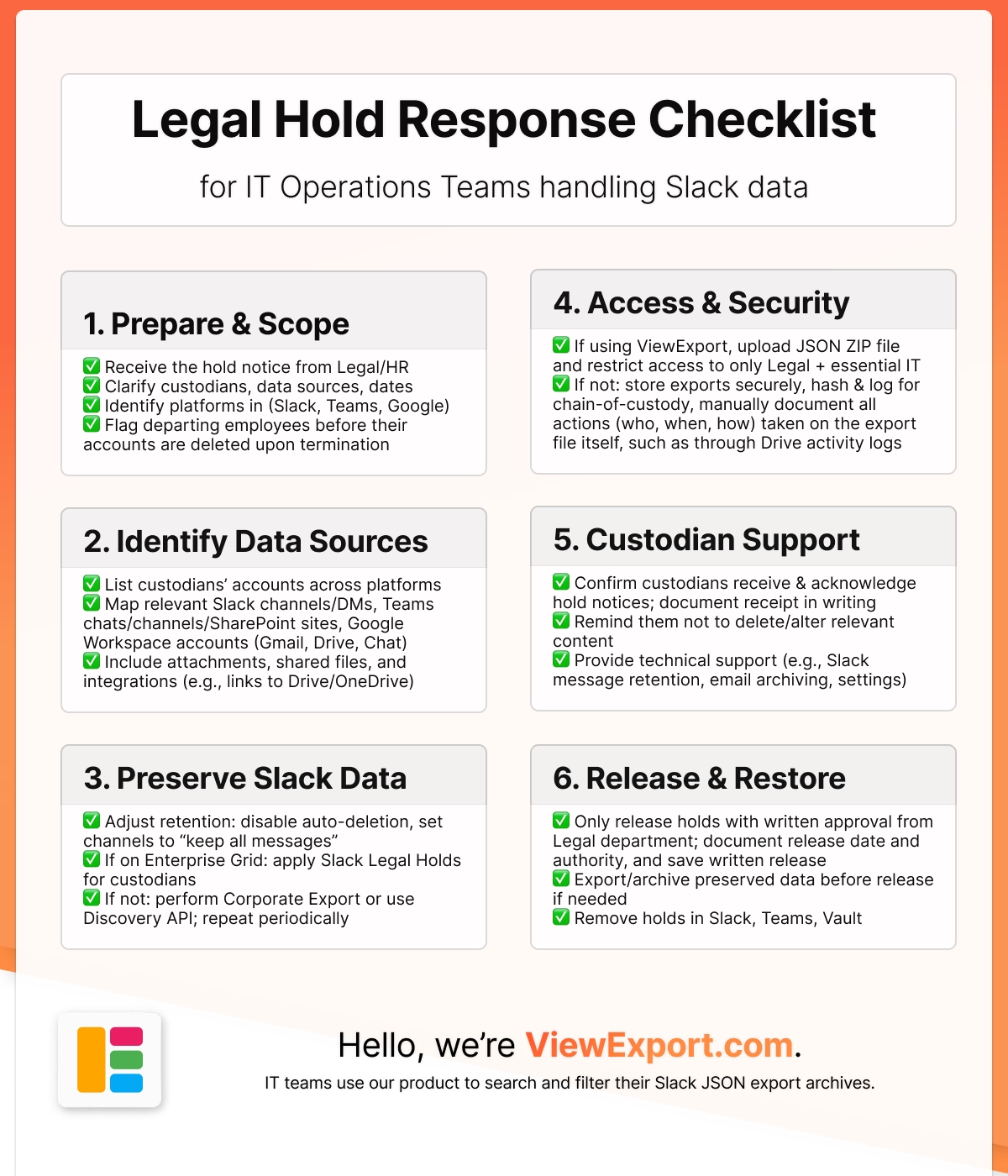
When a legal hold is triggered, here's your Slack-specific checklist:
You can also make a copy of the Google Sheets version of that checklist, by clicking this link. Then, for every matter, just create a new tab and check off as you go.
P.S. If you'd like a short version of this to save to your desktop, we have that for you:
A legal hold on Slack remains in effect until the legal matter is resolved and the hold is officially released by legal counsel. For Enterprise Grid plans, holds can be maintained indefinitely. However, Free and Pro plans are limited by Slack's retention policies (90 days and 1 year respectively), making immediate export critical.
Once messages are deleted in Slack and pass the retention period, they cannot be recovered unless you're on Enterprise Grid with a legal hold already in place. This is why proactive preservation is essential—you must export data before it's permanently deleted.
On Enterprise Grid, legal holds can include private channels and DMs if you have appropriate permissions. On Free, Pro, and Business+ plans, you can only export public channels by default. Private channel and DM access requires either user consent or Workspace Owner/Admin privileges depending on your workspace settings.
Slack's native eDiscovery API is only available on Enterprise Grid plans ($12.50+ per user/month). Lower-tier plans require manual exports or third-party tools. For one-time exports, services like ViewExport provide free trials and $2-5k/year of typical pricing thereafter, to process and search export archives.
Yes, Slack exports can be admissible as electronic evidence if properly authenticated and the chain of custody is documented. You should maintain export metadata, hash values for file integrity, and detailed logs showing when and how data was preserved. Converting to readable formats (PDF, CSV) with timestamps and user attribution strengthens evidentiary value.
Failure to preserve relevant Slack data can result in spoliation sanctions, which may include monetary penalties, adverse inference instructions (where the court tells the jury to assume the deleted evidence was unfavorable to your case), or even case dismissal. Courts have increasingly imposed severe sanctions for negligent or intentional destruction of ESI.
Only Enterprise Grid plans offer automated legal hold features through Slack's native tools. For other plans, you'll need to either manually export data regularly or use third-party automation tools that can schedule exports and integrate with your legal hold workflow.
Proper documentation includes: (1) a legal hold notice issued to relevant custodians, (2) written acknowledgment from those custodians, (3) detailed logs of when exports were performed, (4) hash values or checksums proving data integrity, (5) metadata showing export scope and date ranges, and (6) chain of custody documentation tracking who accessed the data and when.

PST, EML, MSG, and MBOX are four different ways to package email data, and they don't work interchangeably. Here's what each one stores, where it comes from, and which tools open or convert it.
 Alex Boyd
PST files are Outlook's local email archive format. They show up in migrations, eDiscovery exports, and investigations. Here's what they contain, how to open one with or without Outlook, and why PST makes a poor long-term archive.
Alex Boyd
What EML files are, where they come from, how to open them on Windows and Mac, and how to convert EML to PDF for review or production in a legal or compliance context.
Alex Boyd